If you have run a Microsoft 365 tenant for any length of time, you have probably seen an address like [email protected] sitting in a mailbox's email addresses and wondered why it is there. Nobody added it. Nobody uses it. And yet, the first time you bring a second company into the same tenant, or move mailboxes between tenants, that little address can be the reason things break. This is my attempt to explain what it is, how Microsoft builds it, and what I have learned from running into it.
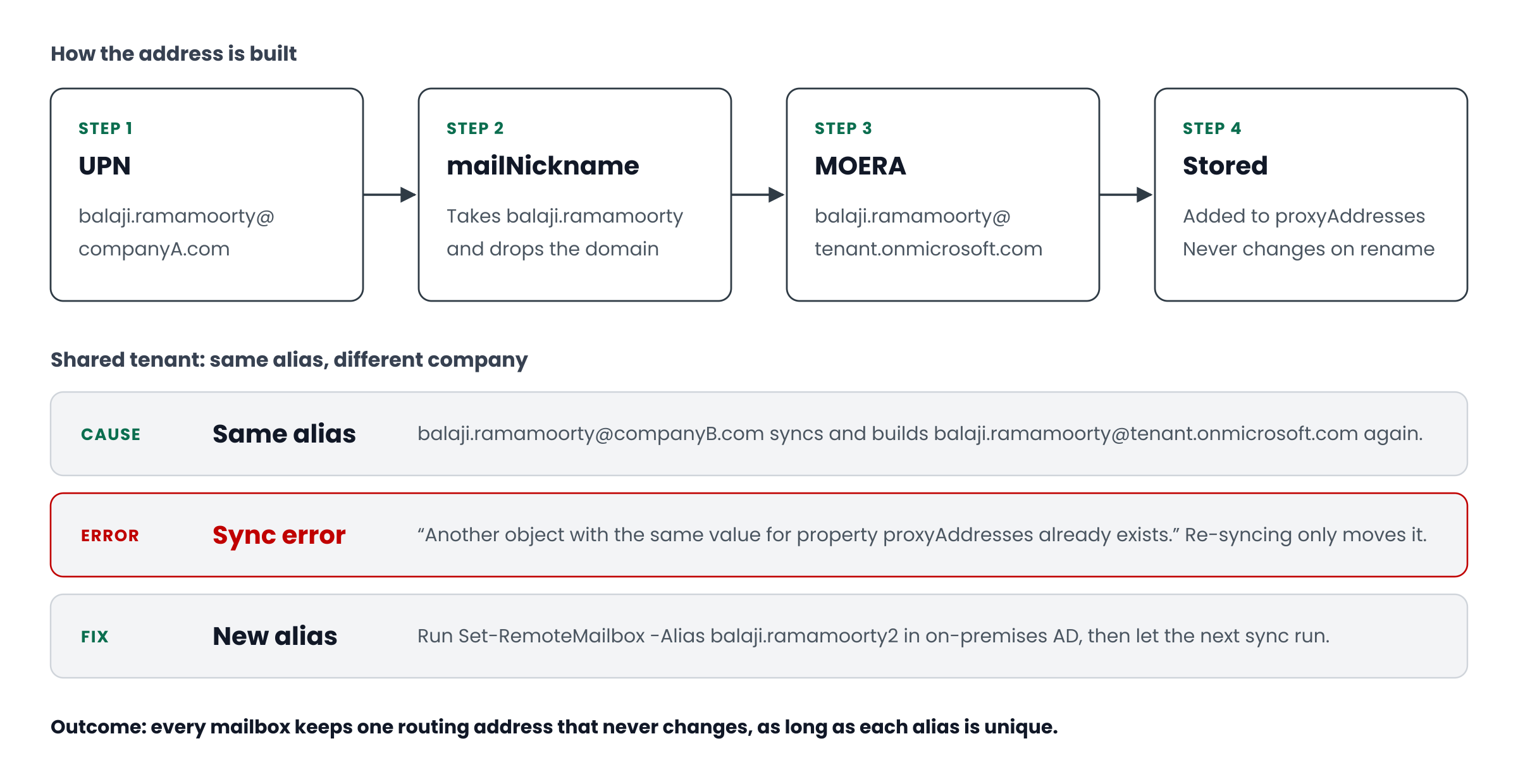
So what is MOERA?
MOERA stands for Microsoft Online Email Routing Address. It is the [email protected] address that Microsoft quietly adds to every mailbox, shared mailbox and group in Exchange Online.
Think of it as the tenant's internal postal address. Your custom domain, say companyA.com, is the address you print on business cards. But custom domains come and go. You add them, move them, sometimes remove them. Microsoft needs one address it knows will always work, whatever you do with your domains, and that is the MOERA.
It comes from the initial domain, the tenant.onmicrosoft.com name you chose when the tenant was created. Microsoft verifies it automatically, which is why a brand new tenant can send and receive mail before you have touched DNS. And here is the important part: you can never remove it. It is the anchor the whole tenant hangs off.
A few things worth knowing straight away:
- It is not meant for people. Users should send and receive on the custom domain. Microsoft now restricts external mail from mailboxes whose primary address is
onmicrosoft.com, so it is not even a viable fallback any more. - It lives in
proxyAddresses. You will see it as a lowercasesmtp:entry, which means a secondary address, next to the uppercaseSMTP:primary. - Exchange insists on keeping one. Every recipient needs at least one MOERA. Try to remove the last one and Exchange will refuse.
How Microsoft builds it
This is the part that surprised me the first time, and once it clicks, most MOERA problems make sense.
Let's take a user called Balaji. His UPN is [email protected], and the tenant's initial domain is tenant.onmicrosoft.com.
1. Something triggers it
The MOERA is not created the moment the user exists. It is created when the user becomes an Exchange recipient, usually when you assign an Exchange Online licence or when a synced user arrives with mail attributes already filled in. It is not instant, so do not panic if it takes a little while to appear.
2. Microsoft takes the alias
Microsoft looks at the user's mailNickname, which is the Exchange alias. For Balaji, that is balaji.ramamoorty. If mailNickname is empty, it falls back to the part of the UPN before the @.
3. It adds the initial domain
The alias gets glued to the initial domain, and that is the whole calculation:
balaji.ramamoorty + @ + tenant.onmicrosoft.com = [email protected]
Notice what is missing. The custom domain, companyA.com, plays no part at all. Only the alias makes it through. Keep that in mind, because it is the root of the conflict problem later on.
4. It checks nobody else has it
An email address can belong to only one object in the tenant. Before saving the MOERA, Microsoft checks whether any other user, group or contact already holds [email protected]. If someone does, the step fails and the user is left with a sync error.
5. It saves the address
If the address is free, it is added to Balaji's proxyAddresses:
SMTP:[email protected]is the primary address people see.smtp:[email protected]is the MOERA, quietly doing its job.
6. It never changes again
This is the bit that confuses people. Say Balaji's UPN later changes to [email protected]. You might expect the MOERA to follow. It does not. It stays as [email protected].
That is deliberate. A routing address that changed every time someone renamed a user would not be much use for routing. So if you see a MOERA that looks out of date, leave it. It is not broken, it is just old.
If you prefer it as logic:
moera = mailNickname + "@" + initialDomain
if moera already belongs to another object -> sync error
else -> add smtp:moera to proxyAddresses
UPN changes later -> moera stays the same
When two companies share one tenant
Now for where this actually hurts. Imagine you are merging two organisations into one tenant, or syncing a second Active Directory forest. Both companies happen to have someone called Balaji Ramamoorty.
[email protected]syncs first. Microsoft builds[email protected]and saves it. All good.[email protected]syncs next. Microsoft builds exactly the same address, because only the alias counts. The address is taken, so this user fails with an error like "Another object with the same value for property proxyAddresses already exists."
Two different people, two different domains, one clash. Microsoft does not rename anyone automatically. It just stops and waits for you to sort it out.
How I fix it
First, find out who has the address. It is usually obvious, but sometimes it turns out to be an old contact or a group you had forgotten about.
Get-EXORecipient -ResultSize unlimited |
  Where-Object { $_.EmailAddresses -match "[email protected]" } |
  Format-List Name, RecipientType, EmailAddresses
Then change the alias on the second user, at the source. This is where people often go wrong. If the user syncs from on-premises Active Directory, AD is in charge. Change it in the cloud and the next sync just puts it back. So make the change on-premises:
# On-premises Exchange Management Shell
Set-RemoteMailbox [email protected] -Alias balaji.ramamoorty2
Finally, let it sync and check. After the next Entra Connect cycle, the second Balaji Ramamoorty should have [email protected], and the error should be gone.
One thing not to do: delete the failing account and sync it again, hoping it will sort itself out. It will not. The conflict just moves to whichever account comes back second.
How I avoid it next time
Honestly, the best fix is not needing one. Before a second forest or company goes into sync scope, I pull the aliases from both sides and look for duplicates:
Get-ADUser -Filter * -Properties mailNickname |
  Group-Object mailNickname | Where-Object Count -gt 1
Run it against each forest, put the results together, and rename any clashes before the first sync. It is a ten-minute job up front, against hours of chasing sync errors afterwards. It also helps to agree a naming rule for the incoming company, such as an extra initial or a short company prefix, so new starters do not bring the problem back.
A quick word on hybrid
If you run Exchange hybrid, you will also have a second Microsoft domain: tenant.mail.onmicrosoft.com. It does a different job.
When a mailbox moves from on-premises Exchange to Exchange Online, the on-premises side still needs to know where to send that person's mail. So the user's targetAddress in AD is set to something like [email protected]. On-premises Exchange sees that, and forwards the mail to the cloud.
When migrated users suddenly stop getting internal mail, nine times out of ten I find a wrong or missing targetAddress or proxyAddresses value in AD. It is tempting to start pulling connectors apart, but check those attributes first. It is usually quicker.
Where else it catches people out
- Tenant-to-tenant migrations. Each tenant has its own initial domain, so the source and target MOERAs are different. Forwarding during cutover depends on the target address being right. Write both down before you start, because it is much harder to work out mid-migration.
- Tidying up proxy addresses. Old MOERAs look like clutter, and someone always wants to clean them up. Do not. Exchange needs them, and removing them can break routing in ways that are hard to trace.
- Choosing the tenant name. The initial domain also shows up in your SharePoint and OneDrive URLs, and you are stuck with it. Spend a minute on the name at sign-up, because a test name chosen in a hurry tends to stick around for years.
My short checklist
If you only take a few things from this:
- Check for duplicate
mailNicknamevalues before adding any forest or company to sync. - Make alias changes in AD, not in the cloud, for synced users.
- Leave MOERA addresses where they are.
- Check
targetAddressfirst when hybrid mail goes missing. - Write down the source and target initial domains before any tenant migration.
MOERA is one of those things you never think about until it bites. Once you know it is just "alias plus initial domain, set once and never changed", most of the strange behaviour stops being strange.