Most Azure projects that go wrong do not fail on technology. They fail because nobody agreed why the organisation was moving, who owns the platform, or what "done" looks like. The Microsoft Cloud Adoption Framework (CAF) is Microsoft's answer to that: a set of guidance, checklists and tools that walks an organisation from the first business conversation to running Azure well for years. This is how the framework fits together, what each phase produces, and how I would use it on a real programme.
What the framework is, and what it is not
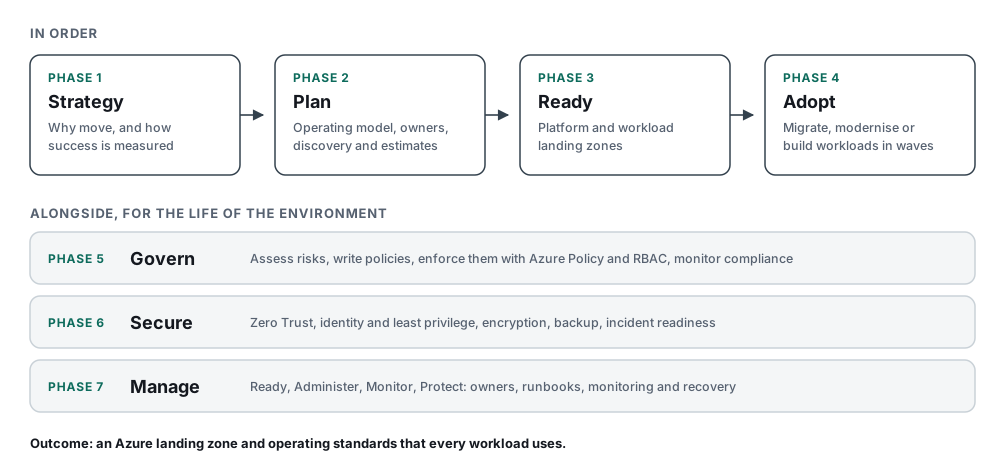
CAF is not a product and not a certification. It is free guidance on Microsoft Learn, written from the experience of Microsoft, partners and customers. Its main scenario, Azure adoption, has seven phases. The first four run roughly in order. The last three, Govern, Secure and Manage, start early and never stop.
The outcome Microsoft describes is an Azure landing zone and operational standards that support every workload you put in Azure. That is a useful test: if a programme ends with workloads in Azure but no agreed landing zone, owners or standards, it has skipped part of the framework.
The seven phases
1. Strategy: why are we doing this?
Strategy turns "we should be in the cloud" into reasons a board can measure. The steps are:
- Define motivations, mission and objectives. A data centre lease ending, a hardware refresh, faster delivery, resilience, a merger. Each motivation leads to different priorities.
- Define the strategy team. The leaders who set direction and remove blockers.
- Prepare the organisation. Executive sponsorship, alignment with other strategies, and whether the current operating model still fits.
- Inform the strategy with cost efficiency, resiliency, security and sustainability.
For an infrastructure team, the most useful output is a short list of measurable objectives, such as "leave the main data centre before the lease ends" or "recover any tier 1 service within four hours". Every later design decision can be checked against them.
2. Plan: how will we get there?
Plan turns the strategy into a programme. Microsoft describes two paths. A start-up building cloud-native applications follows part of it: prepare, plan, estimate and document. An enterprise with existing workloads follows all of it: prepare, plan, discover, select, assess, estimate and document.
Two decisions here shape everything else:
- The cloud operating model. Centralised, shared management or decentralised, or a mix. This decides whether a central platform team owns networking, identity and policy, or whether workload teams run their own subscriptions.
- Who owns what. Governance, security, operations and, increasingly, AI adoption, each with a primary and a backup owner, written down and shared with partners.
Discovery and assessment are where infrastructure engineers earn their keep. A server inventory is rarely accurate. Tools such as Azure Migrate find what is really running and map dependencies, so the plan is based on facts rather than a spreadsheet from three years ago.
3. Ready: build the landing zone
Ready prepares the environment before any workload arrives. Microsoft defines an Azure landing zone as an architecture for governing, securing and scaling a multi-subscription Azure environment. It has two parts:
- The platform landing zone. The shared foundation: the management group hierarchy, and central services such as connectivity, identity, security monitoring and management. Most organisations need only one per Microsoft Entra tenant.
- Workload landing zones. The subscriptions where workload teams deploy, inside the guardrails of the platform. Each workload gets its own landing zone, with development, test and production environments, placed under management groups such as Corp or Online.
A repeatable way to create workload landing zones, which Microsoft calls subscription vending, stops every new project from becoming a ticket queue.
You can build the platform yourself, but for most organisations Microsoft's accelerators are the faster route. The Azure Landing Zones IaC Accelerator deploys the platform with Bicep or Terraform, using Azure Verified Modules. A portal accelerator is available too, but infrastructure as code is easier to review, repeat and keep in step with change control.
4. Adopt: migrate, modernise or build
Adopt is where workloads move. Microsoft frames it as migrating, modernising and building workloads. In practice that means choosing an approach per workload:
- Rehost when speed matters most, for example a data centre exit.
- Replatform or refactor when the workload will be around for years and the change pays for itself, such as moving SQL Server to Azure SQL Managed Instance.
- Rebuild as cloud-native when the business needs something the old design cannot give.
- Retire what discovery shows nobody uses. On every large migration I have seen, this list is longer than people expect.
Migrations go in waves, each with a test migration, a cutover window and a rollback plan. The habits from a good physical-to-virtual programme carry over directly: accurate inventory, agreed downtime, tested rollback and clean-up afterwards.
5. Govern: control the environment
Governance keeps the environment within the rules the organisation set for itself. The Govern phase has five steps:
- Build a cloud governance team. You do this once.
- Assess cloud risks.
- Document cloud governance policies.
- Enforce the policies.
- Monitor compliance.
Steps two to five repeat. In Azure, enforcement mostly means Azure Policy assigned at management group level, role-based access control, tagging standards and budgets. Writing the policy down first matters: a policy in Azure that nobody can explain is soon disabled.
6. Secure: protect it from day one
Secure is not a phase you reach after migration. Microsoft's Secure methodology runs through every other phase, from teams and roles through to Manage, with a cloud security checklist as the task register. It builds on the Zero Trust adoption framework and maps controls to confidentiality, integrity and availability. It also covers incident preparedness, so the team knows how to detect, contain and recover before the first incident, not during it.
For infrastructure engineers, the practical items are familiar: strong identity with MFA and least privilege, network segmentation, encryption, backup and disaster recovery, and Microsoft Defender for Cloud with secure score to show where the gaps are.
7. Manage: run it well
Manage covers operations after go-live. The methodology follows four parts, which Microsoft calls RAMP: Ready, Administer, Monitor and Protect. It starts by deciding which management responsibilities sit with the central platform team and which sit with workload teams, across areas such as security, monitoring, cost, reliability and performance.
The output is written operations: change, deployment and disaster recovery procedures, runbooks and playbooks, named owners, and regular reviews. If you already run ITIL-style BAU operations, much of this is familiar. The difference is that more of it can be automated.
Beyond the core: scenarios
Azure adoption is the foundation. Microsoft adds scenarios that build on it, including a unified data platform, AI adoption, AI agents, sovereignty and Azure VMware Solution. If your programme includes one of these, start from the foundation and add the scenario guidance on top, rather than treating it as a separate project.
How I would use CAF on a real programme
- Start with the reasons. Two or three measurable objectives beat a long vision statement.
- Decide the operating model early. Most landing zone arguments are really arguments about who owns what.
- Build the platform landing zone with code from the IaC accelerator, then change it through pull requests and change control.
- Discover before you design waves. Let dependency data, not assumptions, decide what moves together.
- Put governance and security in place before the first production workload, not after the tenth.
- Write down operations while the project team is still there, so BAU teams inherit runbooks rather than tribal knowledge.
You do not need to follow every page of the framework to benefit from it. Use the checklists to make sure no decision is skipped, and keep the parts that fit the size of your organisation.
Useful references
- Microsoft Learn: Cloud Adoption Framework for Azure overview
- Microsoft Learn: Azure landing zones and the platform landing zone implementation options
- Microsoft Learn: Well-Architected Framework, for designing the workloads that sit in the landing zone
CAF and the Well-Architected Framework work together. CAF prepares the organisation and the platform. Well-Architected helps you design each workload well. Between them they cover most of what the AZ-305 exam expects an architect to know.